Run Waterfall Node Testnet9 in Docker
What is new in delegate fork? March 19th at 8:00 UTC, at slot 2,729,920, which corresponds to epoch 85,310
Features
- Optimization of storage:
This will reduce disk storage requirements significantly and decrease the number of read/write operations.
At present(15/02/2024), a node synchronized from scratch will require 50 GB of storage. - Integration of stake delegation functions into the protocol.
This functionality will enable the following use cases:- Distribution of stake ownership and/or rewards. For example, three users sharing a stake and rewards equally.
- Rules for a trial period, during which one or more users can withdraw their stake and rewards, with additional withdrawals permitted afterwards.
- One or more users can initiate reward or stake payouts, while other users receive rewards and/or stakes.
This will allow hot wallets to send rewards or stake to cold wallets, ensuring the security of your WATER tokens. - Import keys
Fixes
- Enhanced synchronization between coordinators and verifiers.
- Resolution of synchronization errors when a node performs a stake or reward withdrawal operation.
- Additional minimum block validation before block retransmission across the network.
What is new?
Features
- Optimizations and improvements in synchronization.
During previous synchronization, the coordinating node was synchronized first, and then the shard node. Now synchronization occurs in parallel, which has reduced synchronization time by about 1/3. - Improve search for new peers in the shard. Improved search for new peers in the shard, boot, and regular nodes, with added filtration by genesis. Now nodes initiate a connection only if their genesis matches. This has reduced the amount of spam during connection, and nodes can now find each other faster.
- Verifiers are automatically unlocked.
Previously, it was necessary to specify the addresses that needed to be unlocked when starting the node so that verifiers could sign blocks. Now it is sufficient to specify the path to the password file and the account will be unlocked before creating the block. - Proposer recommendation.
An improvement on optimistic consensus has been implemented where participants in the previous slot send their DAG to one another, and the leader uses this information to publish an optimal block. This step adds reliability to the operation of optimistic consensus. - Empty block creation.
If there were no blocks in the epoch due to the lack of transactions in the network, the verifier can create an empty block. This is necessary in order to generate a new hash, which is used for shuffling and determining the roles for verifiers. This reduces the risk of predictability of verifier roles when there are no transactions in the network. - Estimate of transaction gas.
Previously, transaction gas costs were estimated during block creation and validation, which was irrelevant. We now add gas validation when the transaction is added to the pool and during finalization. We use the value specified in the transaction to validate the block size. - Storage optimization.
We optimized the storage of the state on the coordinator. Compared to testnet9, we reduced it by a factor of 4. Currently, approximate expenses for disk space are increasing by 1 GB every day.
Fixes
- Fixed the issue with calculating the hash for the state
- Fixed deployment of contracts in Hardhat and Remix
- Fixed downloading multiple large blocks simultaneously
- Fixed the launch of the node in read mode
- Fixed the shard from the last saved checkpoint during node startup.
- Fixed the bloom indexer.
Refactoring
- Optimized the signature of the block in the shard
- Optimized the creation of a block in the shard.
- Refactored validation of a block in the shard
- Deleted unused Sealer
- Deleted unused bad block.
- Update version of the blst library
- Optimized the propagation of blocks, allowing us to increase the block size to 10,000 transactions.
Video manual
Install Docker
You need to install Docker, which will allow you to perform further steps consistently across any operating system. You can install Docker for your operating system using the following links:
Requirements
Hardware Requirements
1 Validator 1 Node
Minimum Requirements
- CPU (Cores):
2.0 - Memory (GiB):
4.0 - SSD Disk (GiB):
256.0 - Bandwidth (Mb/s):
20.0 - Traffic approximately
1.0TB per month
Recommended Requirements
- CPU (Cores):
4.0 - Memory (GiB):
8.0 - SSD Disk (GiB):
512.0 - Bandwidth (Mb/s):
20.0 - Traffic approximately
1.0TB per month
32 Validators 1 Node
Minimum Requirements
- CPU (Cores):
4.0 - Memory (GiB):
8.0 - SSD Disk (GiB):
256.0 - Bandwidth (Mb/s):
20.0 - Traffic approximately
1.0TB per month
Recommended Requirements
- CPU (Cores):
8.0 - Memory (GiB):
16.0 - SSD Disk (GiB):
512.0 - Bandwidth (Mb/s):
20.0 - Traffic approximately
1.0TB per month
256 Validators 1 Node
Minimum Requirements
- CPU (Cores):
8.0 - Memory (GiB):
16.0 - SSD Disk (GiB):
256.0 - Bandwidth (Mb/s):
20.0 - Traffic approximately
1.0TB per month
Recommended Requirements
- CPU (Cores):
16.0 - Memory (GiB):
32.0 - SSD Disk (GiB):
512.0 - Bandwidth (Mb/s):
20.0 - Traffic approximately
1.0TB per month
Windows
- For the Windows operating system, you need to use all of the commands in the PowerShell terminal.
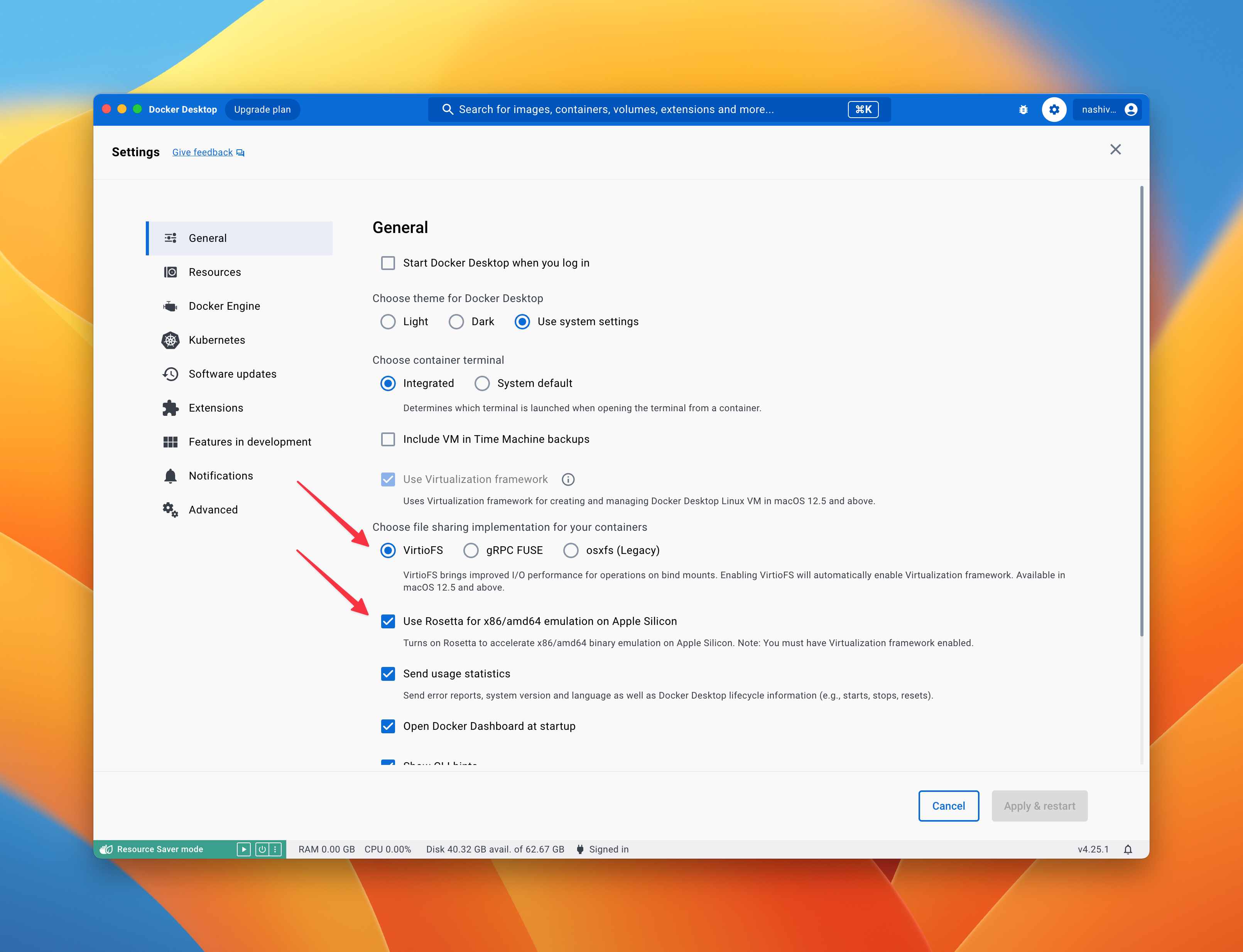
MacOS on arm
We recommend enabling the following settings:
Login to private registry
The source code for Waterfall is currently closed (it will be opened after a security audit), so the source code and images are stored in a private repository. To access the private Docker image registry, you need to log in. Execute the following command in the terminal:
docker login -u public -p glpat-ZNWLTnqqcG6HhXKqJQ5yxm86MQp1OjF4CA.01.0y0zqu5nt registry.waterfall.network
Pull image
Download image from the private registry, where you logged in on the previous step. Use the latest Docker image that contains all the necessary software to run the node. To do this, you need to execute the following command in the terminal:
docker pull registry.waterfall.network/waterfall/protocol/docker:testnet9
Synchronize the time on your computer
Please synchronize the time on your computer for correct validator operation and proper node functionality.
sudo sntp -sS time.apple.com
Run Node
Execute the following command in the terminal:
cd ~
Executing the following command in the terminal:
docker run --platform linux/amd64 --name wf -d --restart unless-stopped -p 4000:4000 -p 13000:13000 -p 12000:12000/udp -p 30303:30303 -p 30303:30303/udp -p 9545:9545 -p 9546:9546 -v $PWD/.wf:/opt/wf/data registry.waterfall.network/waterfall/protocol/docker:testnet9
- the generation of coordinator and verifier keys
- keys are imported into the node wallets
- the node starts up
- delegate function
- The database data is stored in the home directory
~/.wf
The container is kept
--restart unless-stopped brings the node back after a reboot or a Docker daemon
restart. It cannot be combined with --rm — Docker rejects that outright — and --rm
would also throw away the container's anonymous volume on every stop. Use
docker stop wf / docker start wf for routine stops, and docker rm wf only when you
are about to create a new container from a newer image.
On Linux you can instead use host networking, which opens all node ports but keeps the API ports unreachable from outside the machine:
docker run --platform linux/amd64 --name wf -d --restart unless-stopped --network host -e GWAT_COMMANDS="--http.addr=127.0.0.1 --ws.addr=127.0.0.1" -v $PWD/.wf:/opt/wf/data registry.waterfall.network/waterfall/protocol/docker:testnet9
Ports
| Port/protocol | Firewall rule | Reason/caveats |
|---|---|---|
| 9545/TCP | Block all traffic. | This is the JSON-RPC port for your verifier node's Query API. You (and apps) can use this port to check verifier node status, query verifier-layer blockdag data, and even submit transactions. This port generally shouldn't be exposed to the outside world |
| 3500/TCP | Block all traffic. | This is the JSON-RPC port for your coordinator node's Query API. You (and apps) can use this port to check coordinator node status and query consensus-layer chain data. This port generally shouldn't be exposed to the outside world. |
| 4000/TCP | Block all traffic. | Your validator uses this port to connect to your coordinator node via gRPC. Inbound and outbound traffic should be allowed through this port only if your local validator is connecting to a remote coordinator node. |
| */UDP+TCP | Allow outbound traffic. | To discover peers, Coordinator's node dials out through random ports. Allowing outbound TCP/UDP traffic from any port will help Coordinator find peers. |
| 13000/TCP | Allow inbound and outbound traffic. | After we discover peers, we dial them through this port to establish an ongoing connection for libp2p and through which all gossip/p2p request and responses will flow. |
| 12000/UDP | Allow inbound and outbound traffic. | Your coordinator node exposes this UDP port so that other Waterfall nodes can discover your node, request blockdag data, and provide blockdag data. |
| 30303/TCP+UDP | Allow inbound and outbound traffic. | 30303/TCP is your verifier node's listener port, while 30303/UDP is its discovery port. This rule lets your verifier node connect to other peers. Note that some clients use 30301 by default. |
| 9546/TCP | Block all traffic. | Verifier Websocket API Endpoint |
If you want to change the ports, add the following environment variables
GWAT_COMMANDS="--port 30304 --http.port 9445 --ws.port 9446"
COORDINATOR_COMMANDS="--rpc-port 4001 --p2p-tcp-port 13001 --p2p-udp-port 12001"
docker run --platform linux/amd64 --name wf -d --restart unless-stopped -e GWAT_COMMANDS="--port 30304 --http.port 9445 --ws.port 9446" -e COORDINATOR_COMMANDS="--rpc-port 4001 --p2p-tcp-port 13001 --p2p-udp-port 12001" -p 4001:4001 -p 13001:13001 -p 12001:12001/udp -p 30304:30304 -p 9445:9445 -p 9446:9446 -v $PWD/.wf:/opt/wf/data registry.waterfall.network/waterfall/protocol/docker:testnet9
The helper scripts read the ports back out of these variables, so status.sh and the other
commands keep working after you change them.
How to sync faster?
A node started from scratch replays the chain from the genesis block, which takes days. To skip that, seed it from the latest published snapshot. The node downloads, verifies and unpacks it itself, so there is nothing to fetch or extract by hand:
-
Download and unpack. This runs while the node keeps working, and an interrupted transfer resumes where it stopped rather than starting over:
docker exec -it wf /opt/wf/sh/snapshot.sh download -
Switch over. This stops the node, swaps in the new databases and starts it again — a directory rename, so it takes seconds:
docker exec -it wf /opt/wf/sh/snapshot.sh apply -
Check that the node picks up the new state:
docker exec -it wf /opt/wf/sh/status.sh -
Once you are satisfied, free the space taken by the databases it replaced:
docker exec -it wf /opt/wf/sh/snapshot.sh commit
The archive is checked against the SHA-256 published in the
snapshot manifest; a corrupt
download is deleted rather than used. Only gwat/gwat and coordinator/beaconchaindata are
replaced — your wallet, keystores and everything under config/ are untouched.
Free space
The archive and its unpacked copy exist side by side until the unpack finishes, so this
needs roughly twice the archive size in free space — currently about 155 GiB for
Testnet9. snapshot.sh download checks before it starts and stops if there is not enough.
The node still has to catch up from the snapshot height to the current chain head, which
takes a few hours. Wait for status.sh to report The node is synchronized. before you
activate a validator.
See Re-seed the node from a snapshot for the rest of the command set, including how to roll back, and for what changes once the node has active validators.
Check status
You can check the status of the node by executing the following command in the terminal:
docker exec -it wf /opt/wf/sh/status.sh
Main:Node ID: 4b5f2d921489551941b5e48a370ef858957a64e698c14b06036f27774cbc8283- Node IDThe Coordinator Node isn't running- the Coordinator node is not running, it is still startingThe Coordinator node is syncing. Distance: 9294- the Coordinator node is synchronizing, synchronization occurs when Distance will be equal to 0The Verifier Node isn't running- the Verifier node is not running, it is still startingThe Verifier node is syncing. Distance: 149- the Verifier node is synchronizing, synchronization occurs when Distance will be equal to 0The node is synchronized.- the node is synchronized.Coordinator version: 684cde12- the Coordinator client buildVerifier version: d593e142- the Verifier client buildCoordinator peers: 5- number of connected nodes with coordinatorsVerifier peers: 10- number of connected nodes with verifiersCoordinator head: 8480800- the last slot known to the CoordinatorVerifier head: 8480798- the last DAG slot known to the VerifierKeys weren't generated- this means that the keys are still being generated and the node has not yet started
Validator #<validators index>Label: my-node- the label assigned withlabel.sh, ornullwhen no label is set.Coordinator public key: 0xad7aac64a8ab9507a3b06ac46a30d48d89c8bfb4f36d402cfa4e5817ecc37cb01dfd339295f99565367af78aa727a2c1- the coordinator's public key, which holds the stake and earns in the coordinating network.Verifier address: 0x2cd4289d5d5246ccb557a493e65a2ac94914b8b0- the verifier's address, that creates blocks in the BlockDAG network and gets rewards for it.Can Withdraw: 0x2cd4289d5d5246ccb557a493e65a2ac94914b8b0- the addresses that can send a withdrawal transaction.Receives rewards: 0x2cd4289d5d5246ccb557a493e65a2ac94914b8b0=100%- how the rewards are split.Can Exit: 0x2cd4289d5d5246ccb557a493e65a2ac94914b8b0- the addresses that can send a deactivation transaction.Receives stake: 0x2cd4289d5d5246ccb557a493e65a2ac94914b8b0=100%- how the stake is split after exit.Compare with state:- whether the delegation rules stored on this node match the ones recorded on chain:true- they match.false- they differ. The on-chain rules are the ones that apply.unknown- the validator is not on chain yet, so there is nothing to compare against.
The coordinator has not been activated- indicates that either the transaction with the stake has not been sent, or this transaction has not yet been processed.Coordinator status: active_ongoing- coordinator status:pending_initialized- When the first deposit is processed, but not enough funds are available (or it is not yet the end of the first epoch) to get the coordinator into the activation queue.pending_queued- When the coordinator is waiting to get activated, and it has enough funds, etc. While in the queue, the coordinator activation epoch keeps changing until it gets to the front and makes it through (finalization is a requirement here too).active_ongoing- When the coordinator is still attesting, and has not initiated any exit.active_exiting- When the coordinator is still active, but has filed a voluntary request to exit.active_slashed- When the coordinator is still active, but has a slashed status and is scheduled to exit.exited_unslashed- When the coordinator has reached a regular exit epoch, not being slashed, and no longer has to attest, but cannot withdraw yet.exited_slashed- When the coordinator has reached a regular exit epoch, but was slashed, and has to wait for a longer withdrawal period.withdrawal_possible- After the coordinator has exited, and is later permitted to move funds, and is truly out of the system.withdrawal_done- funds have actually been moved
Stake: 32000.000000000 WATER- the stake that was sentCoordinator balance: 32000.038794846 WATER- the coordinator balance, along with the stakeVerifier status: pending_activation- the verifier ispending_activation,activeorexitedVerifier balance: 0.000000000000000000 WATER- the verifier balance
status.sh also accepts a range and a label, which is useful once a node holds many validators:
# a single validator
docker exec -it wf /opt/wf/sh/status.sh 3

# validators 3 to 7
docker exec -it wf /opt/wf/sh/status.sh 3 7

# every validator carrying the label "my-node"
docker exec -it wf /opt/wf/sh/status.sh "" "" my-node
- The Coordinator node needs to synchronize. The
Distancefield should decrease when you run the status command next time - The Verifier node needs to synchronize. Its
Distanceshould decrease as well.
Usually, the synchronization process takes hours and depends on your hardware, internet speed and other factors.
Watch synchronization progress
docker exec -it wf /opt/wf/sh/head.sh
This refreshes once per second and shows the coordinator's finality checkpoints and syncing state next to the verifier's. Press ++ctrl+c++ to leave it.
Onboarding
If the node is running and synchronized (See the result of the status command – The node is synchronized), you can add and activate the validator by taking the following steps:
- Install Metamask according to the instructions
- For convenience, switch to a wide window scale
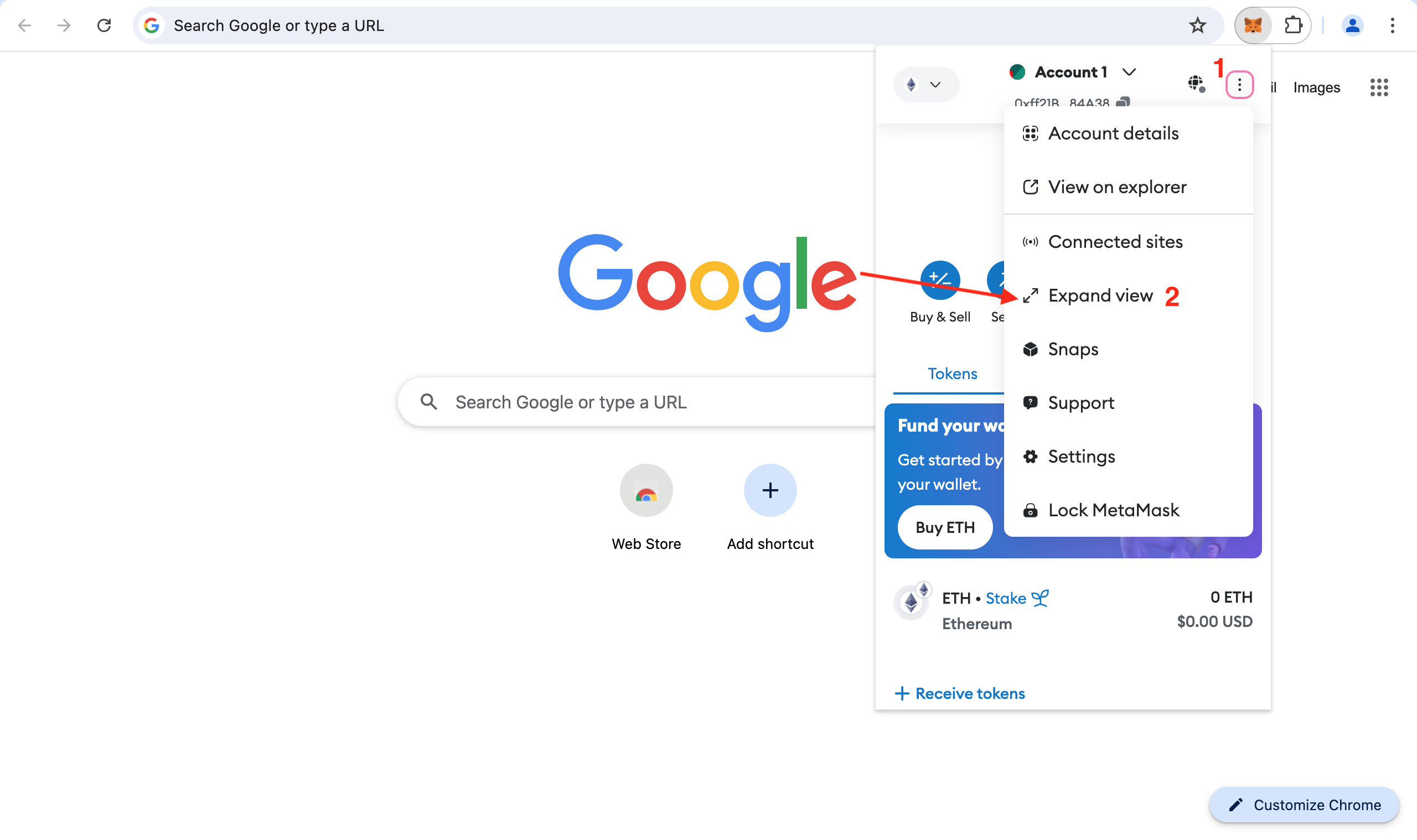
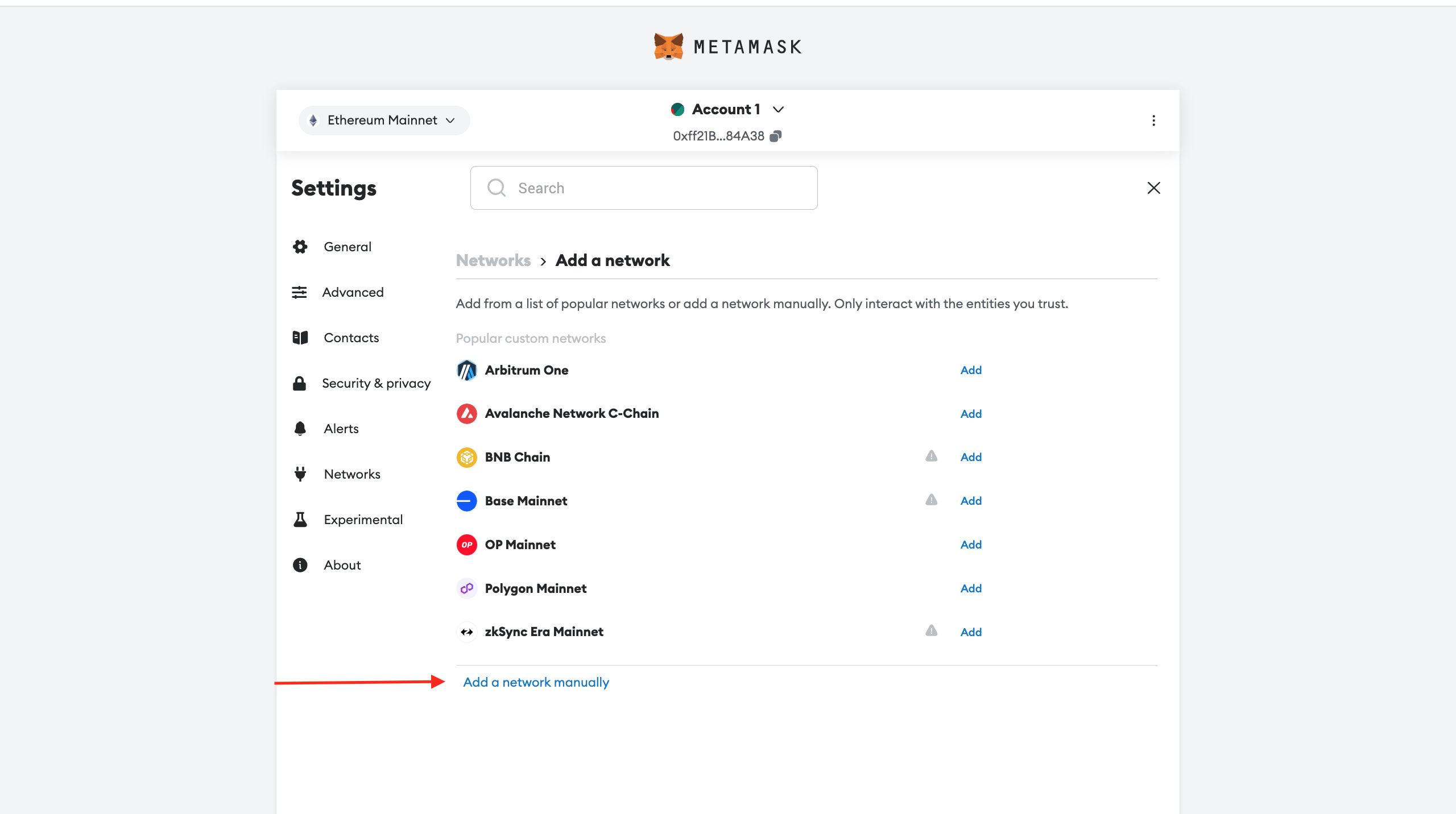
- Go to the Settings
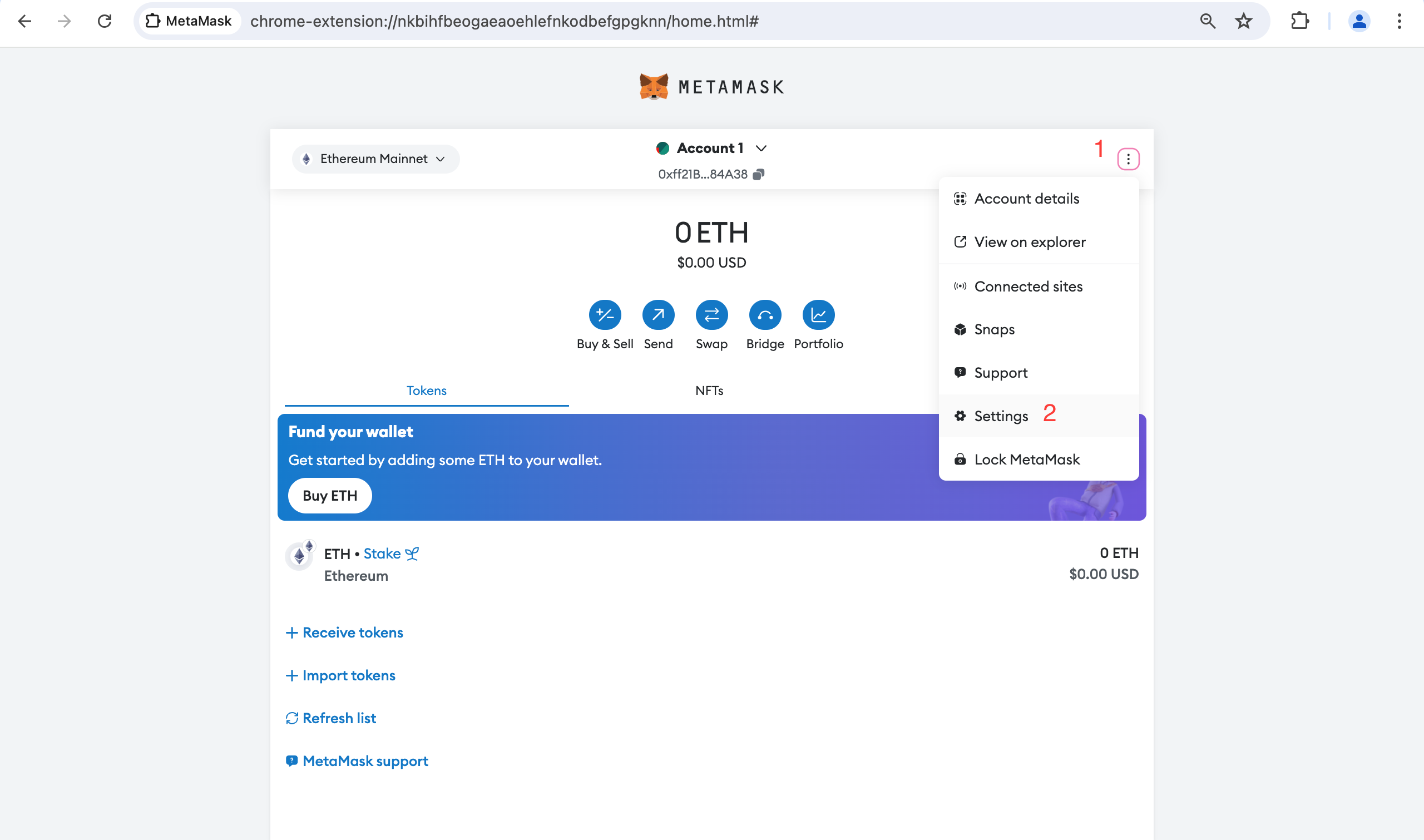
- Click on Network tab and button "Add a network"
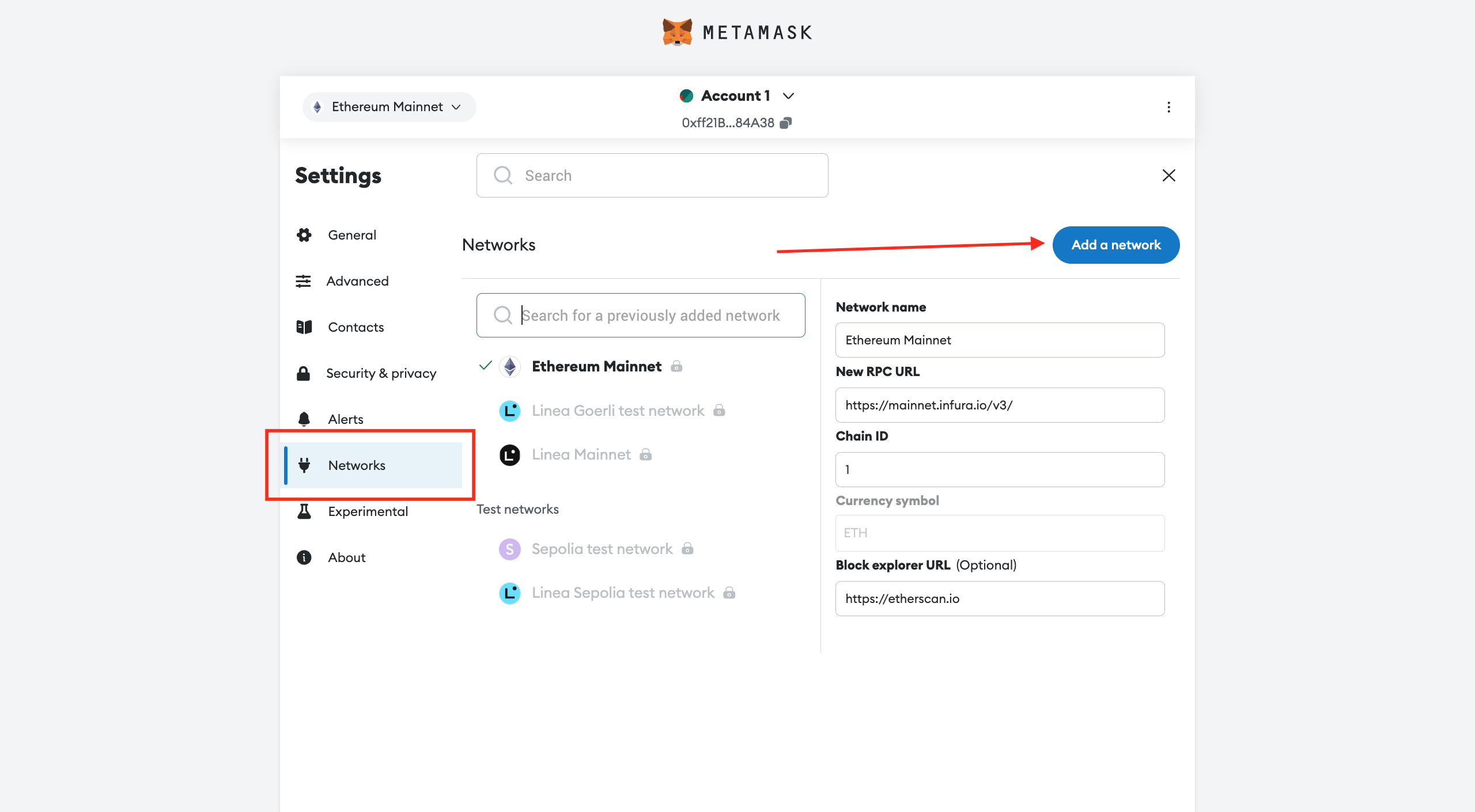
- Click "add a network manually"
-
Add a new network in Metamask by specifying the following parameters:
- Network Name:
Waterfall 9 Test Network - RPC URL:
https://rpc.testnet9.waterfall.network/ - Chain ID:
1501869 - Currency symbol:
WATER - Block Explorer URL: https://explorer.testnet9.waterfall.network
- Network Name:
-
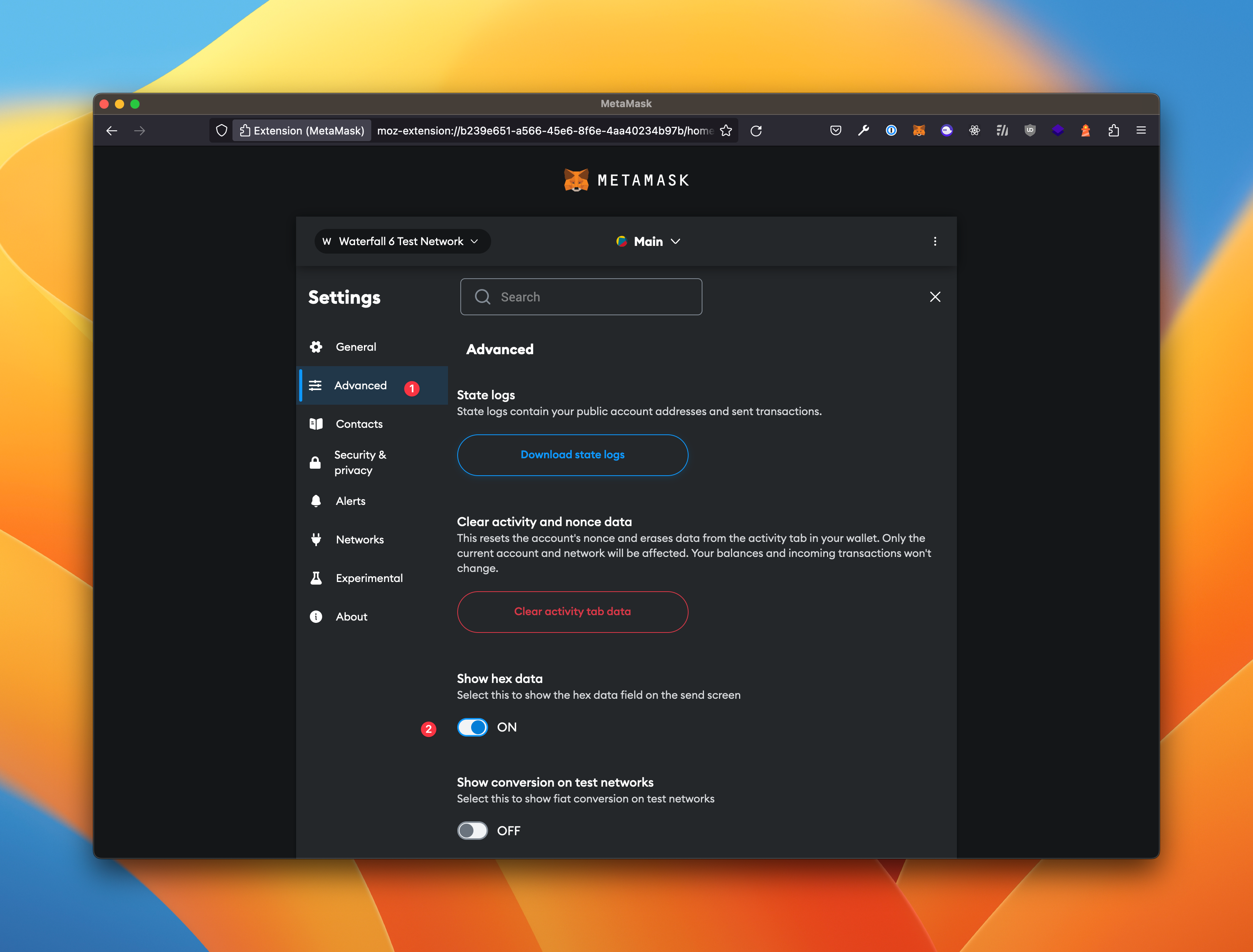
In the advanced settings of Metamask, enable the display of the data field when sending a transaction:
- Create an account address in Metamask if you don't have one already
- On the faucet page, get 40000 WATER for your account. TEST
- Generate keys if you don't have already mnemonic phrases to add a new first validator to your node by running the following command in the terminal:
docker exec -it wf /opt/wf/sh/add.sh new-mnemonic <withdrawals address>
Example 1:
docker exec -it wf /opt/wf/sh/add.sh new-mnemonic 0x375509c85678c61B4e5d4457f8ECdE1EbF32F273
Save next phrases to restore keys in future:

hint deer steak absorb strategy despair bread element fine twice device frozen genuine poem buyer reason agree trip stumble leisure notable country belt sad

Generated new Validator #0:
Coordinator public key: 0xa873ba1a96c1b722c01212aae708f2dcd798a74aa04cb72554b35284e05ca3a5de6df353982f615c5e291a7be5c4d24f
Verifier address: 0x11e99f25514656b9530efdeaf16f685aa0bad1ad
Withdrawal address: 0xee22555a22a7fd2eba102f6200695f75ab28c4b6
Signature: 0x8288fcf30ca8345e193f3ba956620531c18db6264eec8bcba25b985842c10266d84c5c83d09ec2965e746f11c9e33694084d443362ed0a4a3e9a7e01bd8b726315aef4e58cff65e5cdf8a31029866bc5c6f2da70ce5c80e59b38b79d07f5fe47


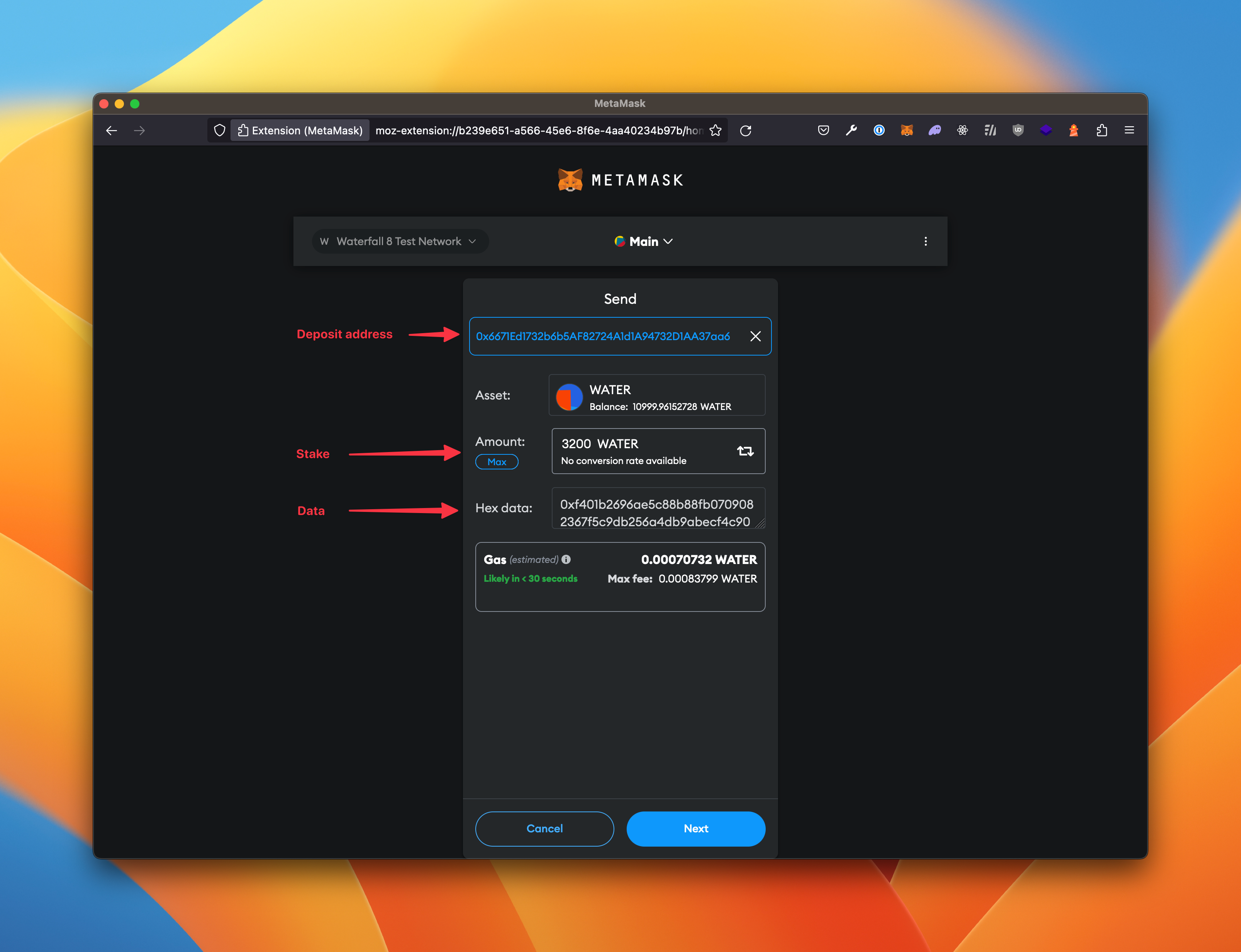
Send tx by Metamask to activate Validator:
To: 0xc3653BD746859b94839c3bA0a8020fEbEc009714
Value: 32000 WATER
Data: 0xf401b2696ae5c88b88fb0709082367f5c9db256a4db9abecf4c9045e58151ad51126ea0ce7cbff76fa4524cfb66395ba168b41f4bbc7feb1ed211d97adab2137c837f586026641f4bbc7feb1ed211d97adab2137c837f5860266adfca54d3ed084d4d64faa112031cc32732ad7980cd3e3905489ea8ff91f4591cb38b0062e4e41375a1a3a22fdc7b4ae0ee19dd1f2dca01d36cccad73c9208dee5e7d94f07b5c355b7c62be306347d80f4cebf03eb048aef9bae2f529208a909
Example 2:
docker exec -it wf /opt/wf/sh/add.sh new-mnemonic 0x30c35895FE0f7768A261b5326e4332cBb4556Ba3
Save next phrases to restore keys in future:

hint deer steak absorb strategy despair bread element fine twice device frozen genuine poem buyer reason agree trip stumble leisure notable country belt sad

Generated new Validator #1:
Coordinator public key: 0xab317784df7c9bcc4d0d85a9475593b3e71164a46f3a40c02af73e1d8422b525f53120c77b5cca0b7ad8bee52d696159
Verifier address: 0xb68a027ffb5089ed1573a301cfa4d1e2f273094c
Withdrawal address: 0x30c35895fe0f7768a261b5326e4332cbb4556ba3
Signature: 0x8288fcf30ca8345e193f3ba956620531c18db6264eec8bcba25b985842c10266d84c5c83d09ec2965e746f11c9e33694084d443362ed0a4a3e9a7e01bd8b726315aef4e58cff65e5cdf8a31029866bc5c6f2da70ce5c80e59b38b79d07f5fe47

  Send tx by Metamask to activate Validator:
  To: 0xc3653BD746859b94839c3bA0a8020fEbEc009714
  Value: 32000 WATER
  Data: 0xf401ab317784df7c9bcc4d0d85a9475593b3e71164a46f3a40c02af73e1d8422b525f53120c77b5cca0b7ad8bee52d696159b68a027ffb5089ed1573a301cfa4d1e2f273094c30c35895fe0f7768a261b5326e4332cbb4556ba3b40601fa62c2682e498ac4005592097e0b1dd840884f6b4bcfdf55db99b6768cce98f1f9c5b3032a447bb9ea79a01297094bbeccdac4a86720969496a916c11416b0fd757345dc6c37b509d537729216278f4b6496808a73b879614f2ad5d9ab
docker exec -it wf /opt/wf/sh/add.sh existing-mnemonic "<mnemonic>" <withdrawals address>
docker exec -it wf /opt/wf/sh/add.sh existing-mnemonic "hint deer steak absorb strategy despair bread element fine twice device frozen genuine poem buyer reason agree trip stumble leisure notable country belt sad" 0x30c35895FE0f7768A261b5326e4332cBb4556Ba3
Generated new Validator #0:
Coordinator public key: 0xb2696ae5c88b88fb0709082367f5c9db256a4db9abecf4c9045e58151ad51126ea0ce7cbff76fa4524cfb66395ba168b
Verifier address: 0x41f4bbc7feb1ed211d97adab2137c837f5860266
Withdrawal address: 0x41f4bbc7feb1ed211d97adab2137c837f5860266
Signature: 0x8288fcf30ca8345e193f3ba956620531c18db6264eec8bcba25b985842c10266d84c5c83d09ec2965e746f11c9e33694084d443362ed0a4a3e9a7e01bd8b726315aef4e58cff65e5cdf8a31029866bc5c6f2da70ce5c80e59b38b79d07f5fe47


Send tx by Metamask to activate Validator:
To: 0xc3653BD746859b94839c3bA0a8020fEbEc009714
Value: 32000 WATER
Data: 0xf401b2696ae5c88b88fb0709082367f5c9db256a4db9abecf4c9045e58151ad51126ea0ce7cbff76fa4524cfb66395ba168b41f4bbc7feb1ed211d97adab2137c837f586026641f4bbc7feb1ed211d97adab2137c837f5860266adfca54d3ed084d4d64faa112031cc32732ad7980cd3e3905489ea8ff91f4591cb38b0062e4e41375a1a3a22fdc7b4ae0ee19dd1f2dca01d36cccad73c9208dee5e7d94f07b5c355b7c62be306347d80f4cebf03eb048aef9bae2f529208a909
docker exec -it wf /opt/wf/sh/add.sh existing-mnemonic "hint deer steak absorb strategy despair bread element fine twice device frozen genuine poem buyer reason agree trip stumble leisure notable country belt sad" 0x30c35895FE0f7768A261b5326e4332cBb4556Ba3
Generated new Validator #1:
Coordinator public key: 0xab317784df7c9bcc4d0d85a9475593b3e71164a46f3a40c02af73e1d8422b525f53120c77b5cca0b7ad8bee52d696159
Verifier address: 0xb68a027ffb5089ed1573a301cfa4d1e2f273094c
Withdrawal address: 0x30c35895fe0f7768a261b5326e4332cbb4556ba3
Signature: 0x8288fcf30ca8345e193f3ba956620531c18db6264eec8bcba25b985842c10266d84c5c83d09ec2965e746f11c9e33694084d443362ed0a4a3e9a7e01bd8b726315aef4e58cff65e5cdf8a31029866bc5c6f2da70ce5c80e59b38b79d07f5fe47
Send tx by Metamask to activate Validator:
To: 0xc3653BD746859b94839c3bA0a8020fEbEc009714
Value: 32000 WATER
Data: 0xf401ab317784df7c9bcc4d0d85a9475593b3e71164a46f3a40c02af73e1d8422b525f53120c77b5cca0b7ad8bee52d696159b68a027ffb5089ed1573a301cfa4d1e2f273094c30c35895fe0f7768a261b5326e4332cbb4556ba3b40601fa62c2682e498ac4005592097e0b1dd840884f6b4bcfdf55db99b6768cce98f1f9c5b3032a447bb9ea79a01297094bbeccdac4a86720969496a916c11416b0fd757345dc6c37b509d537729216278f4b6496808a73b879614f2ad5d9ab
docker exec -it wf /opt/wf/sh/deposit.sh <validators index>
docker exec -it wf /opt/wf/sh/deposit.sh 0
Send tx by Metamask to activate Validator:
To: 0xc3653BD746859b94839c3bA0a8020fEbEc009714
Value: 32000 WATER
Data: 0xf401b2696ae5c88b88fb0709082367f5c9db256a4db9abecf4c9045e58151ad51126ea0ce7cbff76fa4524cfb66395ba168b41f4bbc7feb1ed211d97adab2137c837f586026641f4bbc7feb1ed211d97adab2137c837f5860266adfca54d3ed084d4d64faa112031cc32732ad7980cd3e3905489ea8ff91f4591cb38b0062e4e41375a1a3a22fdc7b4ae0ee19dd1f2dca01d36cccad73c9208dee5e7d94f07b5c355b7c62be306347d80f4cebf03eb048aef9bae2f529208a909
 10. After this, execute the status command in the terminal to determine that your validator is running.
Example:
docker exec -it wf /opt/wf/sh/status.sh
In response, you will get the following result:
Main:
Node ID: a6032d0be6164bb2d534c4b5a34ff71d11be9f6af927fdaafc3b700f914a958a
The node is synchronized.
Coordinator version: 684cde12
Verifier version: d593e142
Coordinator peers: 46
Verifier peers: 21
Coordinator head: 8480800
Verifier head: 8480798

Validator #0:
Coordinator public key: 0x835d0fb507d0d5eee36bcadc3417f1c815db89fbf62f3efa1b2cee0c4d7a9611a76ab406a55e0b375d07dbaef9403111
Verifier address: 0x460599e56f1f97d1dc2551b0eebd5203f8c2f6a3

Can Withdraw: 0x460599e56f1f97d1dc2551b0eebd5203f8c2f6a3
Receives rewards: 0x460599e56f1f97d1dc2551b0eebd5203f8c2f6a3=100%
Can Exit: 0x460599e56f1f97d1dc2551b0eebd5203f8c2f6a3
Receives stake: 0x460599e56f1f97d1dc2551b0eebd5203f8c2f6a3=100%
Compare with state: true

Coordinator status: active_ongoing
Stake: 32000.000000000 WATER
Coordinator balance: 32009.661205673 WATER

Verifier status: active
Verifier balance: 0.07782009910185 WATER
Offboarding
Withdraw
To withdraw your rewards, run the following command:
docker exec -it wf /opt/wf/sh/withdraw.sh <validators index> <amount in WATER>
Example:
docker exec -it wf /opt/wf/sh/status.sh

Main:
  Node ID: a6032d0be6164bb2d534c4b5a34ff71d11be9f6af927fdaafc3b700f914a958a
  The node is synchronized.
  Coordinator version: 684cde12
  Verifier version: d593e142
  Coordinator peers: 46
  Verifier peers: 21
  Coordinator head: 8480800
  Verifier head: 8480798

Validator #0:
  Coordinator public key: 0x8c9c6c673f3ac2e83a068a951ba10d43d5f3f5e15bfc286ea757d8dc741bde89e4f5d5d78222fb6da6b43aed605f195a
  Verifier address: 0x2fe17381e59a1f7ce553faa2a50965244346d996
  Can Withdraw: 0x375509c85678c61b4e5d4457f8ecde1ebf32f273
  Receives rewards: 0x375509c85678c61b4e5d4457f8ecde1ebf32f273=100%
  Can Exit: 0x375509c85678c61b4e5d4457f8ecde1ebf32f273
  Receives stake: 0x375509c85678c61b4e5d4457f8ecde1ebf32f273=100%
  Compare with state: true

  Coordinator status: active_ongoing
  Stake: 32000.000000000 WATER
  Coordinator balance: 32052.400717288 WATER

  Verifier status: active
  Verifier balance: 0.817104889002045 WATER

Validator #1:
  Coordinator public key: 0x835d0fb507d0d5eee36bcadc3417f1c815db89fbf62f3efa1b2cee0c4d7a9611a76ab406a55e0b375d07dbaef9403111
  Verifier address: 0x460599e56f1f97d1dc2551b0eebd5203f8c2f6a3

  Can Withdraw: 0x460599e56f1f97d1dc2551b0eebd5203f8c2f6a3
  Receives rewards: 0x460599e56f1f97d1dc2551b0eebd5203f8c2f6a3=100%
  Can Exit: 0x460599e56f1f97d1dc2551b0eebd5203f8c2f6a3
  Receives stake: 0x460599e56f1f97d1dc2551b0eebd5203f8c2f6a3=100%
  Compare with state: true

  Coordinator status: active_ongoing
  Stake: 32000.000000000 WATER
  Coordinator balance: 32046.366402458 WATER

  Verifier status: active
  Verifier balance: 0.6614708423657251 WATER
docker exec -it wf /opt/wf/sh/withdraw.sh 0 52.400717288

TxHash: "0xa603a6b66a5f2f3d27185a70c3ce25ebccf610e81438be17a0bd51ec8857b87f"
docker exec -it wf /opt/wf/sh/withdraw.sh 1 46.366402458

Send tx by Metamask:
  From: 0x30c35895fe0f7768a261b5326e4332cbb4556ba3
  To: 0xc3653BD746859b94839c3bA0a8020fEbEc009714
  Value: 0 WATER
  Data: 0xf406b68a027ffb5089ed1573a301cfa4d1e2f273094c2e2e3a1987c80000
docker exec -it wf /opt/wf/sh/status.sh

Main:
  Node ID: a6032d0be6164bb2d534c4b5a34ff71d11be9f6af927fdaafc3b700f914a958a
  The node is synchronized.
  Coordinator version: 684cde12
  Verifier version: d593e142
  Coordinator peers: 45
  Verifier peers: 20
  Coordinator head: 8480800
  Verifier head: 8480798

Validator #0:
  Coordinator public key: 0x835d0fb507d0d5eee36bcadc3417f1c815db89fbf62f3efa1b2cee0c4d7a9611a76ab406a55e0b375d07dbaef9403111
  Verifier address: 0x460599e56f1f97d1dc2551b0eebd5203f8c2f6a3
  Can Withdraw: 0x460599e56f1f97d1dc2551b0eebd5203f8c2f6a3
  Receives rewards: 0x460599e56f1f97d1dc2551b0eebd5203f8c2f6a3=100%
  Can Exit: 0x460599e56f1f97d1dc2551b0eebd5203f8c2f6a3
  Receives stake: 0x460599e56f1f97d1dc2551b0eebd5203f8c2f6a3=100%
  Compare with state: true

  Coordinator status: active_ongoing
  Stake: 32000.000000000 WATER
  Coordinator balance: 32000.822642907 WATER

  Verifier status: active
  Verifier balance: 6.7043843461431 WATER

Validator #1:
  Coordinator public key: 0x835d0fb507d0d5eee36bcadc3417f1c815db89fbf62f3efa1b2cee0c4d7a9611a76ab406a55e0b375d07dbaef9403111
  Verifier address: 0x460599e56f1f97d1dc2551b0eebd5203f8c2f6a3
  Can Withdraw: 0x460599e56f1f97d1dc2551b0eebd5203f8c2f6a3
  Receives rewards: 0x460599e56f1f97d1dc2551b0eebd5203f8c2f6a3=100%
  Can Exit: 0x460599e56f1f97d1dc2551b0eebd5203f8c2f6a3
  Receives stake: 0x460599e56f1f97d1dc2551b0eebd5203f8c2f6a3=100%
  Compare with state: true

  Coordinator status: active_ongoing
  Stake: 32000.000000000 WATER
  Coordinator balance: 32001.129999961 WATER

  Verifier status: active
  Verifier balance: 0.00187384655518272 WATER
Transfer
To transfer the rewards to yourself, run the following command:
docker exec -it wf /opt/wf/sh/transfer.sh <validators index> <to address> <amount in WATER>
Example:
docker exec -it wf /opt/wf/sh/status.sh

Main:
  Node ID: a6032d0be6164bb2d534c4b5a34ff71d11be9f6af927fdaafc3b700f914a958a
  The node is synchronized.
  Coordinator version: 684cde12
  Verifier version: d593e142
  Coordinator peers: 45
  Verifier peers: 20
  Coordinator head: 8480800
  Verifier head: 8480798

Validator #0:
  Coordinator public key: 0x835d0fb507d0d5eee36bcadc3417f1c815db89fbf62f3efa1b2cee0c4d7a9611a76ab406a55e0b375d07dbaef9403111
  Verifier address: 0x460599e56f1f97d1dc2551b0eebd5203f8c2f6a3
  Can Withdraw: 0x460599e56f1f97d1dc2551b0eebd5203f8c2f6a3
  Receives rewards: 0x460599e56f1f97d1dc2551b0eebd5203f8c2f6a3=100%
  Can Exit: 0x460599e56f1f97d1dc2551b0eebd5203f8c2f6a3
  Receives stake: 0x460599e56f1f97d1dc2551b0eebd5203f8c2f6a3=100%
  Compare with state: true


  Coordinator status: active_ongoing
  Stake: 32000.000000000 WATER
  Coordinator balance: 32008.067323867 WATER

  Verifier status: active
  Verifier balance: 6.704829048469139 WATER

Validator #1:
  Coordinator public key: 0x835d0fb507d0d5eee36bcadc3417f1c815db89fbf62f3efa1b2cee0c4d7a9611a76ab406a55e0b375d07dbaef9403111
  Verifier address: 0x460599e56f1f97d1dc2551b0eebd5203f8c2f6a3
  Can Withdraw: 0x460599e56f1f97d1dc2551b0eebd5203f8c2f6a3
  Receives rewards: 0x460599e56f1f97d1dc2551b0eebd5203f8c2f6a3=100%
  Can Exit: 0x460599e56f1f97d1dc2551b0eebd5203f8c2f6a3
  Receives stake: 0x460599e56f1f97d1dc2551b0eebd5203f8c2f6a3=100%
  Compare with state: true


  Coordinator status: active_ongoing
  Stake: 32000.000000000 WATER
  Coordinator balance: 32001.350212825 WATER

  Verifier status: active
  Verifier balance: 0.00187384655518272 WATER
docker exec -it wf /opt/wf/sh/transfer.sh 0 0x4d76c92aa070c5fbdef46b309737cf1b42eb07ca 6.7

TxHash: "0x90228c83b80b26128405bda59a9b80a89e7ceeba5cb6b406e06e37649e10f866"
docker exec -it wf /opt/wf/sh/status.sh

Main:
  Node ID: a6032d0be6164bb2d534c4b5a34ff71d11be9f6af927fdaafc3b700f914a958a
  The node is synchronized.
  Coordinator version: 684cde12
  Verifier version: d593e142
  Coordinator peers: 45
  Verifier peers: 20
  Coordinator head: 8480800
  Verifier head: 8480798

Validator #0:
  Coordinator public key: 0x835d0fb507d0d5eee36bcadc3417f1c815db89fbf62f3efa1b2cee0c4d7a9611a76ab406a55e0b375d07dbaef9403111
  Verifier address: 0x460599e56f1f97d1dc2551b0eebd5203f8c2f6a3

  Can Withdraw: 0x460599e56f1f97d1dc2551b0eebd5203f8c2f6a3
  Receives rewards: 0x460599e56f1f97d1dc2551b0eebd5203f8c2f6a3=100%
  Can Exit: 0x460599e56f1f97d1dc2551b0eebd5203f8c2f6a3
  Receives stake: 0x460599e56f1f97d1dc2551b0eebd5203f8c2f6a3=100%
  Compare with state: true


  Coordinator status: active_ongoing
  Stake: 32000.000000000 WATER
  Coordinator balance: 32008.091791963 WATER

  Verifier status: active
  Verifier balance: 0.00444734614309968 WATER

Validator #1:
  Coordinator public key: 0x835d0fb507d0d5eee36bcadc3417f1c815db89fbf62f3efa1b2cee0c4d7a9611a76ab406a55e0b375d07dbaef9403111
  Verifier address: 0x460599e56f1f97d1dc2551b0eebd5203f8c2f6a3

  Can Withdraw: 0x460599e56f1f97d1dc2551b0eebd5203f8c2f6a3
  Receives rewards: 0x460599e56f1f97d1dc2551b0eebd5203f8c2f6a3=100%
  Can Exit: 0x460599e56f1f97d1dc2551b0eebd5203f8c2f6a3
  Receives stake: 0x460599e56f1f97d1dc2551b0eebd5203f8c2f6a3=100%
  Compare with state: true


  Coordinator status: active_ongoing
  Stake: 32000.000000000 WATER
  Coordinator balance: 32001.374680921 WATER

  Verifier status: active
  Verifier balance: 0.00187384655518272 WATER
Exit
To deactivate the validator, run the following command:
docker exec -it wf /opt/wf/sh/exit.sh <validators index>
Example:
docker exec -it wf /opt/wf/sh/status.sh

Main:
  Node ID: a6032d0be6164bb2d534c4b5a34ff71d11be9f6af927fdaafc3b700f914a958a
  The node is synchronized.
  Coordinator version: 684cde12
  Verifier version: d593e142
  Coordinator peers: 5
  Verifier peers: 10
  Coordinator head: 8480800
  Verifier head: 8480798

Validator #0:
  Coordinator public key: 0x835d0fb507d0d5eee36bcadc3417f1c815db89fbf62f3efa1b2cee0c4d7a9611a76ab406a55e0b375d07dbaef9403111
  Verifier address: 0x460599e56f1f97d1dc2551b0eebd5203f8c2f6a3

  Can Withdraw: 0x460599e56f1f97d1dc2551b0eebd5203f8c2f6a3
  Receives rewards: 0x460599e56f1f97d1dc2551b0eebd5203f8c2f6a3=100%
  Can Exit: 0x460599e56f1f97d1dc2551b0eebd5203f8c2f6a3
  Receives stake: 0x460599e56f1f97d1dc2551b0eebd5203f8c2f6a3=100%
  Compare with state: true


  Coordinator status: active_ongoing
  Stake: 32000.000000000 WATER
  Coordinator balance: 32008.140728155 WATER

  Verifier status: active
  Verifier balance: 0.00444734614309968 WATER

Validator #1:
  Coordinator public key: 0x835d0fb507d0d5eee36bcadc3417f1c815db89fbf62f3efa1b2cee0c4d7a9611a76ab406a55e0b375d07dbaef9403111
  Verifier address: 0x460599e56f1f97d1dc2551b0eebd5203f8c2f6a3

  Can Withdraw: 0x460599e56f1f97d1dc2551b0eebd5203f8c2f6a3
  Receives rewards: 0x460599e56f1f97d1dc2551b0eebd5203f8c2f6a3=100%
  Can Exit: 0x460599e56f1f97d1dc2551b0eebd5203f8c2f6a3
  Receives stake: 0x460599e56f1f97d1dc2551b0eebd5203f8c2f6a3=100%
  Compare with state: true

  Coordinator status: active_ongoing
  Stake: 32000.000000000 WATER
  Coordinator balance: 32001.399149017 WATER

  Verifier status: active
  Verifier balance: 0.00187384655518272 WATER
docker exec -it wf /opt/wf/sh/exit.sh 0

TxHash: "0xe94baf143ee61ed30671cf7b53681fa02206d1b79799acdb59a83f3ec0127815"
docker exec -it wf /opt/wf/sh/exit.sh 1

Send tx by Metamask:
  From: 0x30c35895fe0f7768a261b5326e4332cbb4556ba3
  To: 0xc3653BD746859b94839c3bA0a8020fEbEc009714
  Value: 0 WATER
  Data: 0xf403ab317784df7c9bcc4d0d85a9475593b3e71164a46f3a40c02af73e1d8422b525f53120c77b5cca0b7ad8bee52d696159b68a027ffb5089ed1573a301cfa4d1e2f273094c
docker exec -it wf /opt/wf/sh/status.sh

Main:
  Node ID: a6032d0be6164bb2d534c4b5a34ff71d11be9f6af927fdaafc3b700f914a958a
  The node is synchronized.
  Coordinator version: 684cde12
  Verifier version: d593e142
  Coordinator peers: 45
  Verifier peers: 20
  Coordinator head: 8480800
  Verifier head: 8480798

Validator #0:
  Coordinator public key: 0x835d0fb507d0d5eee36bcadc3417f1c815db89fbf62f3efa1b2cee0c4d7a9611a76ab406a55e0b375d07dbaef9403111
  Verifier address: 0x460599e56f1f97d1dc2551b0eebd5203f8c2f6a3

  Can Withdraw: 0x460599e56f1f97d1dc2551b0eebd5203f8c2f6a3
  Receives rewards: 0x460599e56f1f97d1dc2551b0eebd5203f8c2f6a3=100%
  Can Exit: 0x460599e56f1f97d1dc2551b0eebd5203f8c2f6a3
  Receives stake: 0x460599e56f1f97d1dc2551b0eebd5203f8c2f6a3=100%
  Compare with state: true


  Coordinator status: active_exiting
  Stake: 32000.000000000 WATER
  Coordinator balance: 32008.336472923 WATER

  Verifier status: active
  Verifier balance: 0.00404528635967088 WATER

Validator #1:
  Coordinator public key: 0x835d0fb507d0d5eee36bcadc3417f1c815db89fbf62f3efa1b2cee0c4d7a9611a76ab406a55e0b375d07dbaef9403111
  Verifier address: 0x460599e56f1f97d1dc2551b0eebd5203f8c2f6a3

  Can Withdraw: 0x460599e56f1f97d1dc2551b0eebd5203f8c2f6a3
  Receives rewards: 0x460599e56f1f97d1dc2551b0eebd5203f8c2f6a3=100%
  Can Exit: 0x460599e56f1f97d1dc2551b0eebd5203f8c2f6a3
  Receives stake: 0x460599e56f1f97d1dc2551b0eebd5203f8c2f6a3=100%
  Compare with state: true


  Coordinator status: active_ongoing
  Stake: 32000.000000000 WATER
  Coordinator balance: 32001.594893785 WATER

  Verifier status: active
  Verifier balance: 0.00261501709858272 WATER
docker exec -it wf /opt/wf/sh/status.sh

Main:
  Node ID: a6032d0be6164bb2d534c4b5a34ff71d11be9f6af927fdaafc3b700f914a958a
  The node is synchronized.
  Coordinator version: 684cde12
  Verifier version: d593e142
  Coordinator peers: 45
  Verifier peers: 20
  Coordinator head: 8480800
  Verifier head: 8480798

Validator #0:
  Coordinator public key: 0x835d0fb507d0d5eee36bcadc3417f1c815db89fbf62f3efa1b2cee0c4d7a9611a76ab406a55e0b375d07dbaef9403111
  Verifier address: 0x460599e56f1f97d1dc2551b0eebd5203f8c2f6a3

  Can Withdraw: 0x460599e56f1f97d1dc2551b0eebd5203f8c2f6a3
  Receives rewards: 0x460599e56f1f97d1dc2551b0eebd5203f8c2f6a3=100%
  Can Exit: 0x460599e56f1f97d1dc2551b0eebd5203f8c2f6a3
  Receives stake: 0x460599e56f1f97d1dc2551b0eebd5203f8c2f6a3=100%
  Compare with state: true


  Coordinator status: withdrawal_possible
  Stake: 32000.000000000 WATER
  Coordinator balance: 32008.336472923 WATER

  Verifier status: exited
  Verifier balance: 0.00404528635967088 WATER

Validator #1:
 Coordinator public key: 0x835d0fb507d0d5eee36bcadc3417f1c815db89fbf62f3efa1b2cee0c4d7a9611a76ab406a55e0b375d07dbaef9403111
  Verifier address: 0x460599e56f1f97d1dc2551b0eebd5203f8c2f6a3

  Can Withdraw: 0x460599e56f1f97d1dc2551b0eebd5203f8c2f6a3
  Receives rewards: 0x460599e56f1f97d1dc2551b0eebd5203f8c2f6a3=100%
  Can Exit: 0x460599e56f1f97d1dc2551b0eebd5203f8c2f6a3
  Receives stake: 0x460599e56f1f97d1dc2551b0eebd5203f8c2f6a3=100%
  Compare with state: true


  Coordinator status: active_ongoing
  Stake: 32000.000000000 WATER
  Coordinator balance: 32001.594893785 WATER

  Verifier status: active
  Verifier balance: 0.00261501709858272 WATER
Delegate function
The ownership of a stake and of its rewards can be split between several addresses. The rules
are written into the deposit transaction when the keys are generated, so they have to be
prepared before you run add.sh or import.sh.
- A directory named
configappears inside your data directory the first time keys are generated. It holdsconfig.json— the list of validators on this node — and any delegation rule files you put there. - Create a rule file in that directory, for example
~/.wf/config/delegating_stake.json:
cat ~/.wf/config/delegating_stake.json

{
    "rules": {
      "profit_share": {
        "0xee22555a22A7fd2eBA102f6200695F75ab28C4b6": 90,
        "0x30c35895FE0f7768A261b5326e4332cBb4556Ba3": 10
      },
      "stake_share": {
        "0xee22555a22A7fd2eBA102f6200695F75ab28C4b6": 100
      },
      "exit": [
        "0xee22555a22A7fd2eBA102f6200695F75ab28C4b6",
        "0x30c35895FE0f7768A261b5326e4332cBb4556Ba3"
      ],
      "withdrawal": [
        "0xee22555a22A7fd2eBA102f6200695F75ab28C4b6",
        "0x30c35895FE0f7768A261b5326e4332cBb4556Ba3"
      ]
    }
}
- `profit_share` — how the rewards are split, in percent. Must add up to 100.
- `stake_share` — how the stake is returned after exit, in percent. Must add up to 100.
- `exit` — the addresses allowed to send the deactivation transaction.
- `withdrawal` — the addresses allowed to send the withdrawal transaction.
- `trial_period` and `trial_rules` are optional. When you omit them, the node fills in
  `trial_period: 0` and copies `rules` into `trial_rules`.
You can keep several rule files side by side and pick one per validator.
- Pass the file name as the last argument when generating keys:
docker exec -it wf /opt/wf/sh/add.sh existing-mnemonic "my mnemonick" 0xee22555a22A7fd2eBA102f6200695F75ab28C4b6 delegating_stake.json
status.shthen shows the rules and compares them against the chain.Compare with statestaysunknownuntil the deposit transaction is processed, and becomestrueonce the on-chain rules match the ones stored on the node.
Rules cannot be changed later
The delegation rules are part of the deposit transaction. Once a validator is activated they can no longer be edited — you would have to exit the validator and create a new one.
Exit/withdraw
Also, during withdraw/exit, the addresses are displayed, indicating who can do it, Examples:
docker exec -it wf /opt/wf/sh/exit.sh 1

Send tx by Metamask:
  From: 0xee22555a22A7fd2eBA102f6200695F75ab28C4b6,0x30c35895FE0f7768A261b5326e4332cBb4556Ba3
  To: 0xc3653BD746859b94839c3bA0a8020fEbEc009714
  Value: 0 WATER
  Data: 0xf403852e9616f719ce3f7bd9e48eae911c5a49a3f514a6141f5ca39c853cb9e7e71fb2abc060f09f0038436eb8bd2370f8379efc6c79ce9a565751861cf4c8fc46f8b5946d5b

docker exec -it wf /opt/wf/sh/withdraw.sh 1 0

Send tx by Metamask:
  From: 0xee22555a22A7fd2eBA102f6200695F75ab28C4b6,0x30c35895FE0f7768A261b5326e4332cBb4556Ba3
  To: 0xc3653BD746859b94839c3bA0a8020fEbEc009714
  Value: 0 WATER
  Data: 0xf4069efc6c79ce9a565751861cf4c8fc46f8b5946d5b
docker exec -it wf /opt/wf/sh/status.sh 1

Main:
  Node ID: 11b43da29924415f025f8ffcd40787821d6267d6e5f7da9aad9504e2852bbe6c
  The node is synchronized.
  Coordinator version: 684cde12
  Verifier version: d593e142
  Coordinator peers: 10
  Verifier peers: 10
  Coordinator head: 8480800
  Verifier head: 8480798

Validator #1:
  Coordinator public key: 0x852e9616f719ce3f7bd9e48eae911c5a49a3f514a6141f5ca39c853cb9e7e71fb2abc060f09f0038436eb8bd2370f837
  Verifier address: 0x9efc6c79ce9a565751861cf4c8fc46f8b5946d5b

  Can Withdraw: 0xee22555a22a7fd2eba102f6200695f75ab28c4b6,0x30c35895fe0f7768a261b5326e4332cbb4556ba3
  Receives rewards: 0x30c35895FE0f7768A261b5326e4332cBb4556Ba3=10%, 0xee22555a22A7fd2eBA102f6200695F75ab28C4b6=90%
  Can Exit: 0xee22555a22a7fd2eba102f6200695f75ab28c4b6,0x30c35895fe0f7768a261b5326e4332cbb4556ba3
  Receives stake: 0xee22555a22A7fd2eBA102f6200695F75ab28C4b6=100%
  Compare with state: true

  Coordinator status: active_ongoing
  Stake: 32000.000000000 WATER
  Coordinator balance: 32176.127425672 WATER

  Verifier status: active
  Verifier balance: 1.931608903886312 WATER
Import key
- Generate keys by wf-cli (instruction)
- Copy keys to config dir eg:
All three of
.wf/config/keys-123 ├── coordinator │ ├── validator_keys │ │ ├── deposit_data.json │ │ └── keystore-m_12381_3600_0_0_0-*.json │ └── password.txt └── gwat ├── keystore │ └── UTC--*--<verifier address> ├── address.txt └── password.txtcoordinator/validator_keys/deposit_data.json,gwat/password.txtandgwat/address.txtmust be present, otherwise the import stops and tells you which file is missing. - Run import
Optionally attach delegation rules and a label:
docker exec -it wf /opt/wf/sh/import.sh keys-123To attach only a label, pass it in place of the rules file — the script recognises that the second argument is not an existing file and treats it as a label:docker exec -it wf /opt/wf/sh/import.sh keys-123 delegating_stake.json my-nodeThe system will responddocker exec -it wf /opt/wf/sh/import.sh keys-123 my-nodeImporting the same directory twice is safe — validators that are already on the node are skipped:Prepare Validator: ac1a2e7717a4d1bf0eef76c7643f14da845182bd1f0b3525bbe32b24cd5b087b5e11ef87150348a0004e7f766e135aca INFO local-keymanager: Successfully imported validator key(s) publicKeys=0xac1a2e7717a4,0x8c45f4a9af030x802c5a574ae8 Done. 3 Validators have been imported.After this, execute the status command in the terminal to determine that your validator is running. Example:Validator already exists: ac1a2e7717a4d1bf0eef76c7643f14da845182bd1f0b3525bbe32b24cd5b087b5e11ef87150348a0004e7f766e135aca Done. 0 Validators have been imported.In response, you will get the following result:docker exec -it wf /opt/wf/sh/status.shValidator #3: Coordinator public key: 0xac1a2e7717a4d1bf0eef76c7643f14da845182bd1f0b3525bbe32b24cd5b087b5e11ef87150348a0004e7f766e135aca Verifier address: 0x2dddfd7ba0777cbc9d6f8315e7a3cd248d2e2173 Can Withdraw: 0x3ae40befc1638ea949823a5cbac74898a123db3b Receives rewards: 0x3ae40befc1638ea949823a5cbac74898a123db3b=100% Can Exit: 0x3ae40befc1638ea949823a5cbac74898a123db3b Receives stake: 0x3ae40befc1638ea949823a5cbac74898a123db3b=100% Compare with state: unknown The coordinator has not been activated Verifier status: pending_activation Verifier balance: 0 WATER Validator #4: Coordinator public key: 0x8c45f4a9af036224b1d971d200150b76a54d4be0aa980466f5f97d8a18f257393630597ff7fe42b2df83f030332abf1d Verifier address: 0xff61b51a8f9a24904b55540b238ba7268b166c40 Can Withdraw: 0x3ae40befc1638ea949823a5cbac74898a123db3b Receives rewards: 0x3ae40befc1638ea949823a5cbac74898a123db3b=100% Can Exit: 0x3ae40befc1638ea949823a5cbac74898a123db3b Receives stake: 0x3ae40befc1638ea949823a5cbac74898a123db3b=100% Compare with state: unknown The coordinator has not been activated Verifier status: pending_activation Verifier balance: 0 WATER Validator #5: Coordinator public key: 0x802c5a574ae813c506108f7b58ab9dc3b3820c1e859883b3661f0eb42e2c2b55a44924d8b4fdc34898a8ac2d7a86134b Verifier address: 0x4657133d2624a3379f94c6c9838a443928d49daf Can Withdraw: 0x3ae40befc1638ea949823a5cbac74898a123db3b Receives rewards: 0x3ae40befc1638ea949823a5cbac74898a123db3b=100% Can Exit: 0x3ae40befc1638ea949823a5cbac74898a123db3b Receives stake: 0x3ae40befc1638ea949823a5cbac74898a123db3b=100% Compare with state: unknown The coordinator has not been activated Verifier status: pending_activation Verifier balance: 0 WATER
Export key
export.sh writes the validator list of this node into a deposit_data.json file, which can
be fed to tooling that works with deposit data.
- Create the target directory inside
config:mkdir -p ~/.wf/config/backup - Export:
docker exec -it wf /opt/wf/sh/export.sh backupDone. 1 Validators have been exported. - The file lands in
~/.wf/config/backup/deposit_data.json.
Like status.sh, the command takes an optional label and range:
docker exec -it wf /opt/wf/sh/export.sh backup <label> <from> <to>
The export contains the deposit data only — labels and delegation rules are stripped out.
If deposit_data.json already exists in the target directory the command refuses to
overwrite it and stops with ... is already exists.
This is not a key backup
export.sh exports deposit data, not private keys. The only way to restore validators is
the mnemonic phrase you saved when you ran add.sh new-mnemonic.
Label validators
Labels let you group validators — for example per customer, or per batch of imported keys — and then address the whole group at once.
Assign a label to every validator on the node:
docker exec -it wf /opt/wf/sh/label.sh my-node
Done. 1 Validators have been updated.
Assign a label to a range of validators:
docker exec -it wf /opt/wf/sh/label.sh my-node <from> <to>
docker exec -it wf /opt/wf/sh/label.sh my-node 3 7
The label then shows up in status.sh and can be used to filter it:
docker exec -it wf /opt/wf/sh/status.sh "" "" my-node
label.sh writes a backup of the previous validator list to
~/.wf/config/config_bak_<timestamp>_<pid>.json before it makes any change. The ten most recent
backups are kept.
Maintenance
Re-seed the node from a snapshot
snapshot.sh replaces the local chain databases with the latest published snapshot. Seeding
a brand new node is covered in How to sync faster?; this section is
the full command set, and what changes once the node carries validators. Re-seed an existing
node when it has fallen far behind, or when its databases are damaged.
The download, checksum and unpack all run while the node keeps working. Only the final swap needs the node stopped, and that is a directory rename — it takes seconds.
Only gwat/gwat and coordinator/beaconchaindata are replaced. Your wallet, keystores and
everything under config/ are untouched.
snapshot.sh apply looks at whether your validators are actually active on chain, and
only gets in the way when it needs to:
- No validators, or keys that were generated but never activated. They have no signing history, so there is nothing to protect. The command runs without further ado.
- Active validators. You are asked to confirm with
--force, because re-seeding costs you every attestation until the node has caught up to the chain head. Only the chain databases are replaced — the slashing protection history incoordinator/wallet/direct/validator.dbis kept, and with it in place a validator refuses to sign anything it has signed before rather than risk a slashable vote. - Active validators and no
validator.db. You get a blunt warning: that database is what guarantees a validator never signs twice for the same epoch, and a snapshot rolls the chain view back. Restore it if you still have it.--forcestill lets you through if you are certain those keys are not signing anywhere else. - Coordinator not answering. The status cannot be determined, so the command asks you to
check first or pass
--force.
Re-seeding is worth doing when the node is further behind than the snapshot is, or when its databases are damaged — not as routine maintenance.
-
See what is published and what is staged locally:
docker exec -it wf /opt/wf/sh/snapshot.sh status -
Download, verify and unpack. The node keeps running throughout, and an interrupted transfer resumes where it stopped:
The archive is checked against the SHA-256 published in the snapshot manifest; a corrupt download is deleted rather than used.docker exec -it wf /opt/wf/sh/snapshot.sh downloadFree space
The archive and its unpacked copy exist side by side until the unpack finishes, so this needs roughly twice the archive size in free space.
snapshot.sh downloadchecks before it starts and stops if there is not enough. -
Switch over. This stops the node, swaps the databases and starts it again:
The previous databases are kept next to the new ones asdocker exec -it wf /opt/wf/sh/snapshot.sh apply<name>.old_<timestamp>. -
Confirm the node is running on the new state:
docker exec -it wf /opt/wf/sh/status.sh -
Once you are satisfied, free the space taken by the old databases:
docker exec -it wf /opt/wf/sh/snapshot.sh commit
If something is wrong instead, put the previous databases back:
docker exec -it wf /opt/wf/sh/snapshot.sh rollback
Until you run commit or rollback, a second apply is refused — the node always keeps
exactly one set of databases to fall back to.
Keep the validator database small
The coordinator validator keeps a slashing protection history — a record of everything your
validators have signed — in coordinator/wallet/direct/validator.db. Nothing trims it while
the validator runs, so on a node with many validators it grows by gigabytes a week and can
become the largest thing on the disk. Check its size with:
docker exec wf du -h /opt/wf/data/coordinator/wallet/direct/validator.db
When it has grown more than you like, start the history afresh. First see what will happen — this changes nothing:
docker exec -it wf /opt/wf/sh/reset_slashing_protection.sh
It prints the database size and the length of the pause. Then run it in the background:
docker exec -d wf sh -c '/opt/wf/sh/reset_slashing_protection.sh --yes > /opt/wf/data/logs/reset_slashing_protection.log 2>&1'
and follow its progress:
docker exec wf tail -n 20 /opt/wf/data/logs/reset_slashing_protection.log
What it does:
- stops the validator;
- moves
validator.dbaside asvalidator.db.old_<timestamp>; - waits three full epochs — the first command above prints how long that is;
- starts the validator with an empty database;
- once the validator has attested again, deletes the old database and reports how much space
was freed. Add
--keep-oldafter--yesto keep it instead.
It runs in the background because of the pause: closing your terminal does not interrupt it.
Why this is safe. After the pause, every attestation your validators make targets a later epoch than anything they signed before the stop, so they cannot sign anything that conflicts with their past and the old history is never needed. The pause is enforced by the validator itself when it starts, so restarting the container or the machine in the middle of the pause does not start it early.
If no attestation appears within 15 minutes after the pause, the old database is kept and the log shows how to put it back. That is expected on a node whose validators are not active yet.
Never while the same keys are running anywhere else
The reset relies on these keys being used by this node only. If the same keys are running — or may recently have run — on another machine, do not reset: an empty history would not protect you from signing something that conflicts with what the other machine signed, and that gets your validators slashed.
Your validators do not attest during the pause, which costs the rewards for that time.
Why not the validator's built-in pruning
Earlier builds of this image enabled the validator's own history pruning. It only runs when the validator starts, and on a database that has grown for weeks it kept the validator offline for hours after every restart — so it is no longer used.
Stop and start the node
To stop the node:
docker stop wf
To start it again — no need to retype the long docker run command, the container is still
there:
docker start wf
The node is started with --restart unless-stopped, so Docker brings it back automatically
after a reboot or a Docker daemon restart. A node you stopped yourself with docker stop
stays stopped until you start it again.
Reinstall Node
- Stop Node (see instructions above), then remove the container:
docker rm wf - Remove data in home directory
~/.wfby executing the following command in the terminal:rm -R ~/.wf - Pull image (see instructions above)
- Run Node (see instructions above) and other steps in instructions above
Upgrade node
- Stop the node and remove the container. Removing it is what lets you start a new one
from the upgraded image; your data lives in the volume, not in the container.
docker stop wf docker rm wf - Pull image
docker pull registry.waterfall.network/waterfall/protocol/docker:testnet9 - Run Node (see instructions above)
Execute the following command in the terminal:
Executing the following command in the terminal:
cd ~docker run --platform linux/amd64 --name wf -d --restart unless-stopped -p 4000:4000 -p 13000:13000 -p 12000:12000/udp -p 30303:30303 -p 30303:30303/udp -p 9545:9545 -p 9546:9546 -v $PWD/.wf:/opt/wf/data registry.waterfall.network/waterfall/protocol/docker:testnet9
Transfer validators to another computer
Run this in order
A validator must never sign on two machines at the same time. Remove the validators from the old computer before you restore them on the new one.
- On the new computer, launch the node and wait for full synchronization.
restore.shrefuses to run while either client is still syncing. -
On the old computer, delete all validators with the following command.
docker exec -it wf /opt/wf/sh/rm.shThis removes the validator keys, the coordinator wallet and the generated validator list (Now you can restore validators with the following command 'docker exec -it wf /opt/wf/sh/restore.sh "<mnemonic>" <count>'config/config.jsonand its backups). Your own files in~/.wf/config— delegation rule files and imported key bundles — are kept.Give the verifier a moment
rm.shrestarts the verifier, andrestore.shrefuses to run until it has caught back up. If you run both on the same machine, wait untilstatus.shreportsThe node is synchronized.again before restoring. -
Make sure that there are no validators
docker exec -it wf /opt/wf/sh/status.shMain: Node ID: a6032d0be6164bb2d534c4b5a34ff71d11be9f6af927fdaafc3b700f914a958a The node is synchronized. Coordinator version: 684cde12 Verifier version: d593e142 Coordinator peers: 46 Verifier peers: 21 Coordinator head: 8480800 Verifier head: 8480798 Keys weren't generated - On the new computer, run the procedure to restore validators.
Example:
docker exec -it wf /opt/wf/sh/restore.sh "<mnemonic>" <count>docker exec -it wf /opt/wf/sh/restore.sh "hint deer steak absorb strategy despair bread element fine twice device frozen genuine poem buyer reason agree trip stumble leisure notable country belt sad" 2Restored Validator #0: Coordinator public key: 0xb2696ae5c88b88fb0709082367f5c9db256a4db9abecf4c9045e58151ad51126ea0ce7cbff76fa4524cfb66395ba168b Verifier address: 0x41f4bbc7feb1ed211d97adab2137c837f5860266 Withdrawal address: 0x41f4bbc7feb1ed211d97adab2137c837f5860266 Restored Validator #1: Coordinator public key: 0xab317784df7c9bcc4d0d85a9475593b3e71164a46f3a40c02af73e1d8422b525f53120c77b5cca0b7ad8bee52d696159 Verifier address: 0xb68a027ffb5089ed1573a301cfa4d1e2f273094c Withdrawal address: 0x30c35895fe0f7768a261b5326e4332cbb4556ba3 2 Validators were restored.
Without the count the command stops with
Please provide the count of validators to restore.
Validators that the mnemonic produces but that are not found on chain are reported as
Restored Not Found Validator #N and are still added to the node.
Restoring only works on a node that has no validators yet. If there are any, the command
stops with You can restore only on the node where there are no validators.
Deploy Smart-Contract
To deploy smart-contract read instructions
Common Issues and Solutions
-
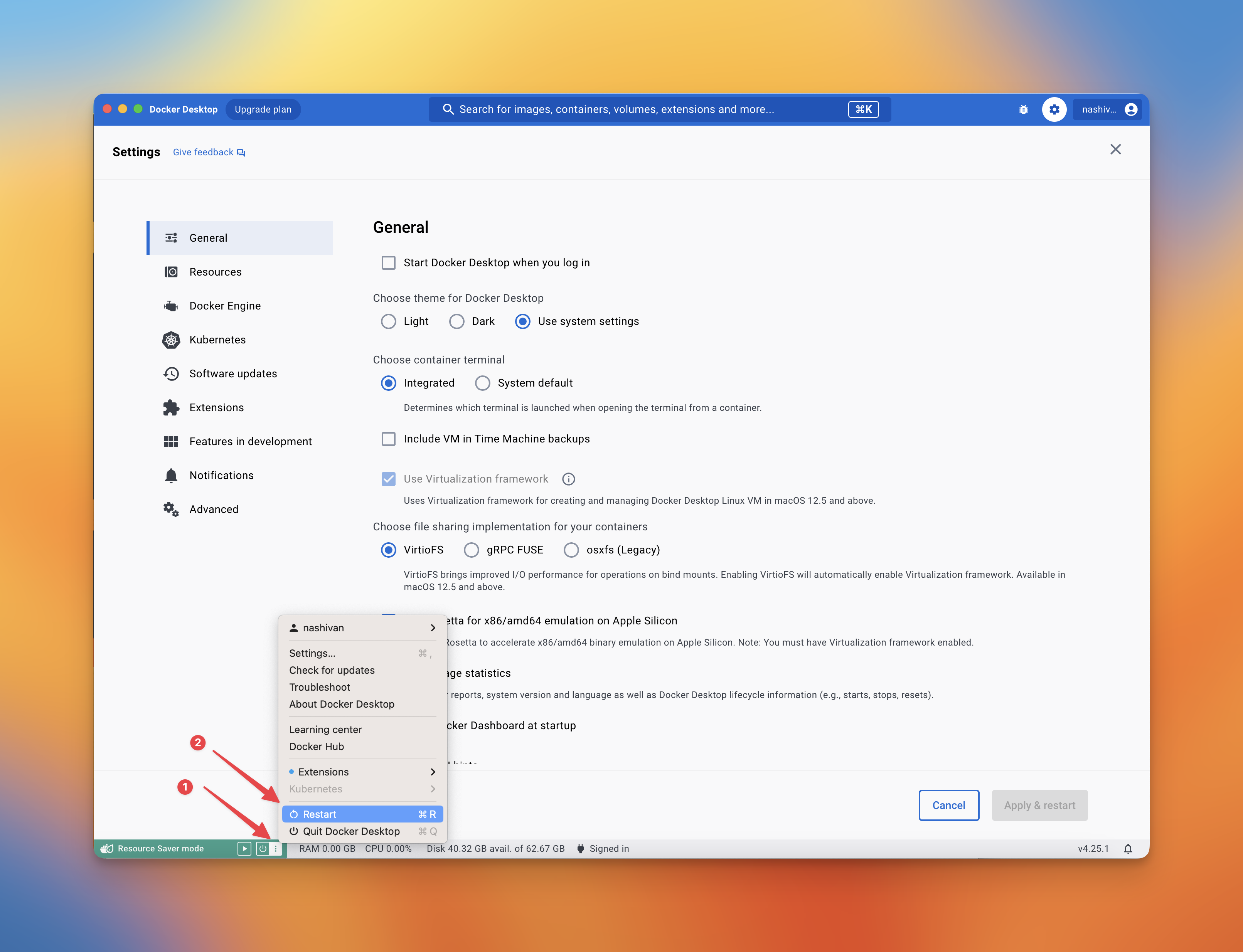
If the peers of the Coordinating node disappeared during synchronization, please restart the Docker
-
Is there an instruction for Linux? For the Linux platform, please install Docker using the instructions. Afterwards, follow our standard installation instruction
-
What are the minimum hardware requirements? The minimum hardware requirements include a CPU with at least 2 cores and 4 GB of RAM. Faster hardware (mainly CPU and RAM) is preferable for better performance. The number of Validators you have should match the hardware resources you possess, and a faster internet speed is also essential. The HDD size doesn't increase when you add additional Validators.
-
How many Validators can I run on a one node(one PC)? For now, we guarantee stable work for 16 Validators on 1 node.
-
Can I run 2 nodes on 2 PCs with the same IP. Yes, you can.
-
Why is the synchronization taking so long? Why is the synchronization taking so long? The synchronization process is time-consuming due to its comprehensive nature, involving the download of the entire network state. The latest snapshot manifest lists the current download URL, SHA-256 hash, and size for each network. We are exploring potential enhancements that could lead to faster synchronization in the future.
-
Why Verifier balance is 0? Time must pass for the coordinator's balance to change after 4 eras. This will take approximately an hour.
-
Is it possible for my node to incur penalties? If your node is not running and not synchronized (e.g., your PC is off or in sleep mode, the connection is interrupted, or you turned off the SSD with a snapshot), you will receive penalties. If your clock is significantly behind or ahead, the information you receive from other network participants may be invalid. As a result, your validator will not function correctly and will incur penalties.
-
coordinator-validatorshowsFATALin the container logs. This is expected on a node that has no validator keys yet. The process starts once you runadd.sh,import.shorrestore.sh. -
status.shprints a warning about/opt/wf/data/config. The node was started with the old three-volume layout, so the validator list is not on a volume you control and will be lost on the next restart. Stop the container, remove it and start it again with a single volume, using the run command above:-v $PWD/.wf:/opt/wf/data. The three directories the old layout mounted all live under~/.wf, so the single volume covers exactly the same data. -
How do I check the node's health from a script? The container serves two probes on
http://127.0.0.1:8080/inside its network namespace. Publish the port with-p 8080:8080to reach them from the host./— readiness:200once the node is synced,503while it is not./live— liveness:200while the clients are alive and answering,503when one of them has crashed or stopped responding. A node that is still syncing stays200here, and so does one whose processes were stopped on purpose bysnapshot.sh applyorreset_slashing_protection.sh. On503the body carries the reason, for example{"status": false, "reason": "gwat is FATAL"}.
Docker's own
HEALTHCHECKuses/live, sodocker psreportsunhealthyfor a broken node but not for one that is merely syncing.